🔧 IPN TROUBLESHOOTING GUIDE
Comprehensive step-by-step troubleshooting for Instant Payment Notifications
🚀 Quick Navigation
🎯 Troubleshooting Progress
🌐 Environment Access Details
🧪 UAT Environment
User: su – extio_user
Password: ********
Escalate: sudo su -
API URL: https://ke-staging.apizone.io
Usage: Testing and development environment. Safe for experimental commands and configuration changes.
🏭 PROD Environment
Connection: ssh apizone@10.0.3.11 -p7779
Password: ********
Escalate: sudo su -
API URL: https://ke-production.dtb.net
⚠️ Caution: Production environment. Make changes carefully and always backup configurations before modifications.
📋 Overview
Purpose: This guide provides systematic troubleshooting steps for IPN (Instant Payment Notification) issues. Follow each step sequentially to identify and resolve connectivity problems between banking systems and external services.
Prerequisites: Ensure you have access to both UAT and PROD environments. All commands should be executed with appropriate privileges (sudo/root access when required).
🔍 Step-by-Step Troubleshooting
Objective: Find the Account Number From the bank you will get logs or xlsx file. Look in those logs and find the account number. In payload there is:
<Acc>account-number</Acc>
What this step accomplishes:
- ✅ Verifies account registration in webhook system
- ✅ Retrieves port configuration for the account
- ✅ Confirms IPN endpoint mapping
- ✅ Validates webhook URL and host details
🧪 UAT Environment Command
# UAT Environment - Replace (account-number) with actual account number from logs
curl --location 'https://ke-staging.apizone.io/caching-services/camel-rest/az/cache/find/KE:MASTER:WEBHOOK:ACCOUNT:(account-number)' \
--header 'Content-Type: application/json' \
--connect-timeout 30 \
--max-time 60🏭 PROD Environment Command
# PROD Environment - Replace (account-number) with actual account number from logs
curl --location 'https://ke-production.dtb.net/caching-services/camel-rest/az/cache/find/KE:MASTER:WEBHOOK:ACCOUNT:123456789' \
--header 'Content-Type: application/json' \
--connect-timeout 30 \
--max-time 60📊 Response Analysis
{
    "reversal_allowed": "N",
    "excluded_currency": "MUR, INR",
    "registered_jms_endpoint": "N/A",
    "account_number": "0807871001",
    "debit_allowed": "Y",
    "excluded_tcode": "404,204",
    "excluded_modules": "AB,CD",
    "registered_email_id": "N/A",
    "template_sms": "APIZone-SMS-Template.vm",
    "account_name": "NOTRE DAME SIS.-SCHOOL A/C",
    "failover_http_endpoint": "http://lbr1:37005/api/openApi/organization-notification/dtb-africa-direct",
    "excluded_class": "LDRPAC",
    "registered_sms_msisdn": "N/A",
    "exchange_format": "REST",
    "additional_text": "NOTIFICATION_FIELD:ADDL_TEXT",
    "amount_above": "0",
    "registered_http_endpoint": "http://lbr1:37005/api/openApi/organization-notification/dtb-africa-direct",
    "currency": "KES",
    "credit_allowed": "Y",
    "branch_code": "008",
    "account_description": "NOTRE DAME SIS.-SCHOOL A/C",
    "template_email": "APIZone-Email-Template.vm"
}
Purpose: Locate and verify port configuration in system files to ensure proper routing between load balancer and upstream services.
🔍 OpenResty Configuration Check
# Navigate to OpenResty configuration directory
cd /etc/openresty/conf.d

# List all configuration files with details
ls -la *.conf

# Search for specific port configuration (replace 18007 with port from Step 1)
echo "Searching for port 18007 in configurations..."
grep -r "18007" . --include="*.conf"

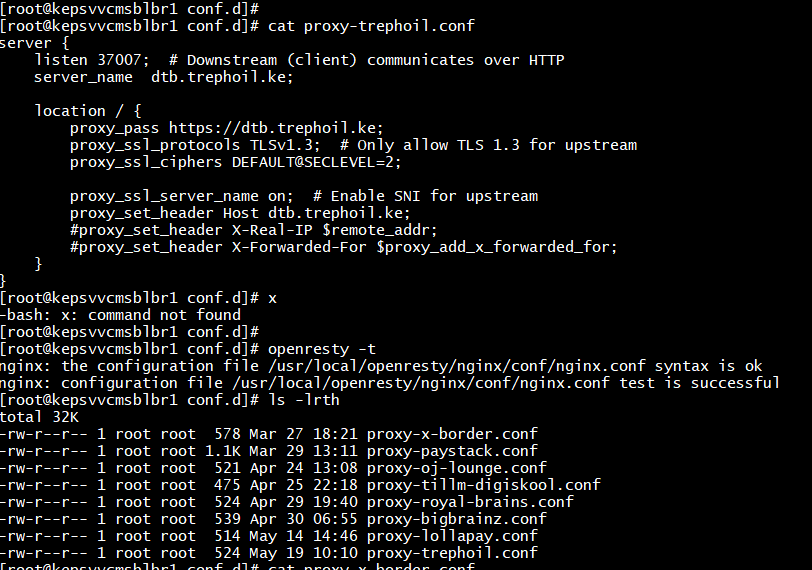
# Example: cat proxy-lollapay.confserver {
listen 7909;
server_name localhost;
location / {
proxy_pass http://79.89.852:32775;
proxy_set_header Host $host;
proxy_set_header X-Real-IP $remote_addr;
proxy_set_header X-Forwarded-For $proxy_add_x_forwarded_for;
}
}
Alternative Location: If configuration is not found in OpenResty, check HAProxy configuration.
# Navigate to HAProxy directory
cd /etc/haproxy/

# Display HAProxy version and configuration file location
haproxy -vv

# Check main configuration for webhook/IPN routing
echo "=== Searching for port 18007 in HAProxy configuration ==="
cat haproxy.cfg | grep -A 20 -B 10 "18007"Critical Step: Test network connectivity to the IPN endpoint. Connection failures at this stage indicate network-level issues that require immediate escalation to the bank team.
# Extract host and port from Step 1 results
HOST="192.168.1.100"  # Replace with actual host from cache lookup
PORT="18007"          # Replace with actual port from cache lookup

echo "Testing connectivity to $HOST:$PORT"

# Test 1: Telnet port connectivity
echo "=== Telnet Port Test ==="
telnet $HOST $PORT

# Test 2: Netcat port connectivity
echo "=== Netcat Port Test ==="
nc -zv $HOST $PORT

# Test 3: Nmap port scan
echo "=== Nmap Port Scan ==="
nmap -p $PORT $HOST
✅ Successful Connection Indicators:
            Trying 192.168.1.100...

            Connected to 192.168.1.100.

            Escape character is '^]'.


            nc: Connection to 192.168.1.100 18007 port [tcp/*] succeeded!

            18007/tcp open
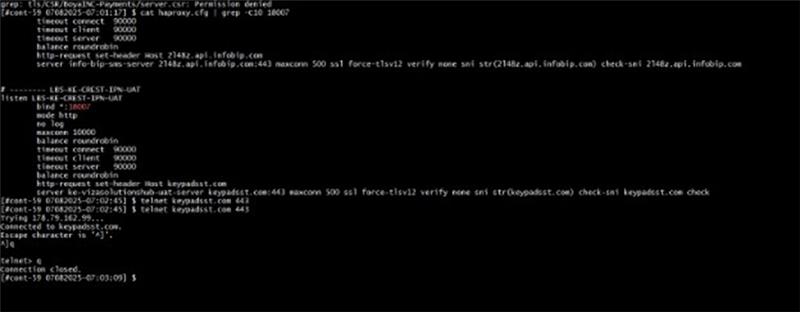
❌ Connection Failure Scenarios:
Connection refused- Service not running on target portConnection timed out- Network connectivity/firewall issuesNo route to host- Routing configuration problemsNetwork unreachable- Network infrastructure issues
Objective: Bypass load balancers and proxy servers to test direct communication with the IPN endpoint using actual transaction payload data.
# Extract payload using CBS reference number provided by bank team from rover application utility logs
CBS_REF="CBS_REF_123456"  # Replace with actual CBS reference

# Search for the transaction payload in logs
grep -r "$CBS_REF" /path/to/logs/ --include="*.log"

# Extract the full XML/JSON payload from logs for testing#curl -kv -XPOST "https://BANK-PROVIDED-URL" \
-H "Content-Type: application/json" \
-d '{
"xref": "EXT8AE09ED9C40A0A2A2B2554E3AB001",
"cbs_reference": "110CDPO172380008",
"cbs_module": "RT",
"account_number": "0692625001",
"branch_code": "002",
"currency": "KES",
"transaction_time": "20170826 23:49:12",
"value_date": "22-Mar-2023",
"amount": "1500",
"reversal_indicator": "n",
"debit_credit_indicator": "C",
"exchange_rate": "1",
"financial_year": "FY2017",
"transaction_code": "625",
"transaction_description": "MOBILE MASTERPASS TXN",
"virtual_pan": "5297500010022358",
"rrn": "723815631446",
"customer_name": "John Doe",
"customer_mobile": "254700000000",
"available_balance": "7166684.00",
"serial_number": "564506514",
"narration": "User remarks",
"instr_code": "014256"
}'
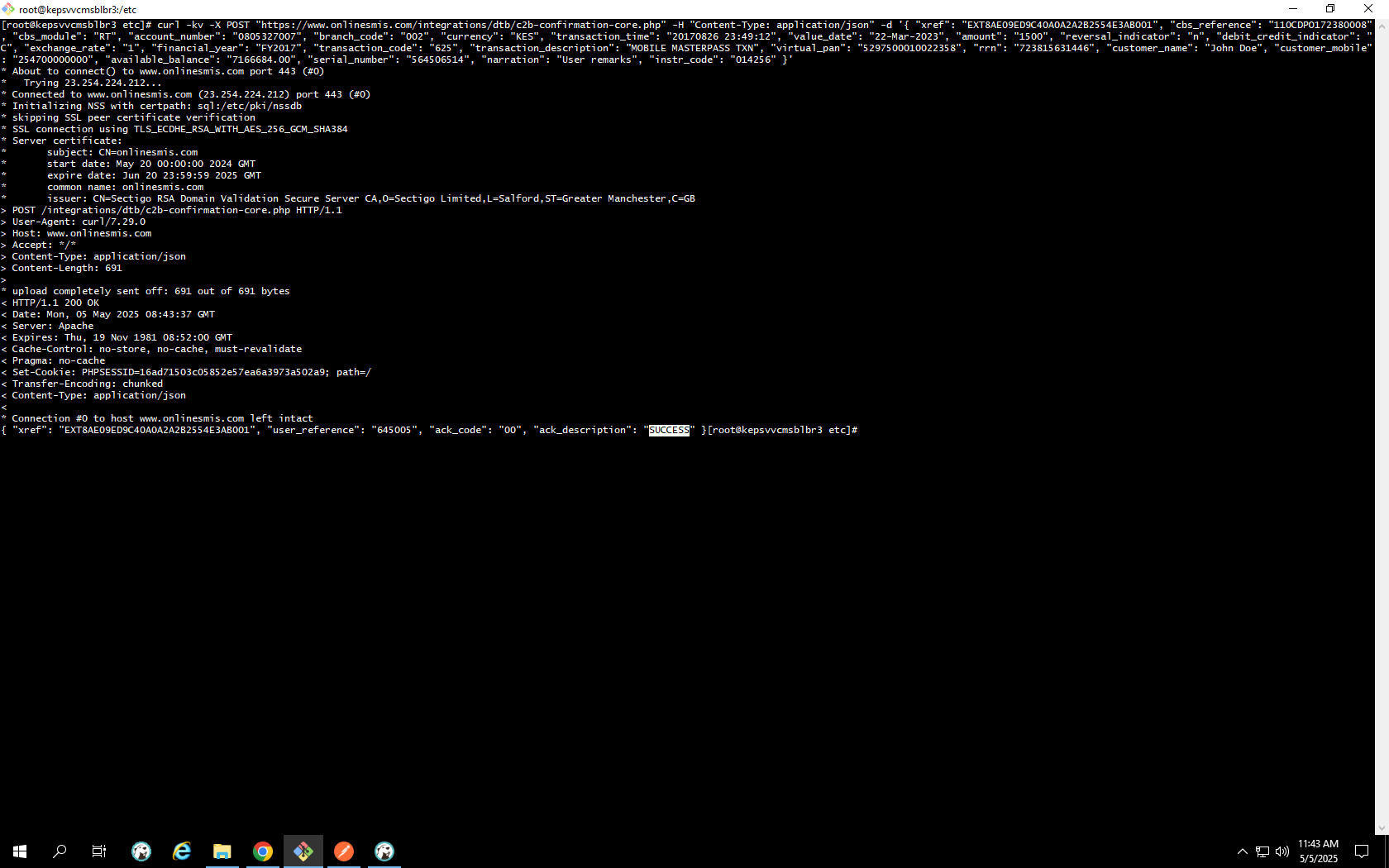
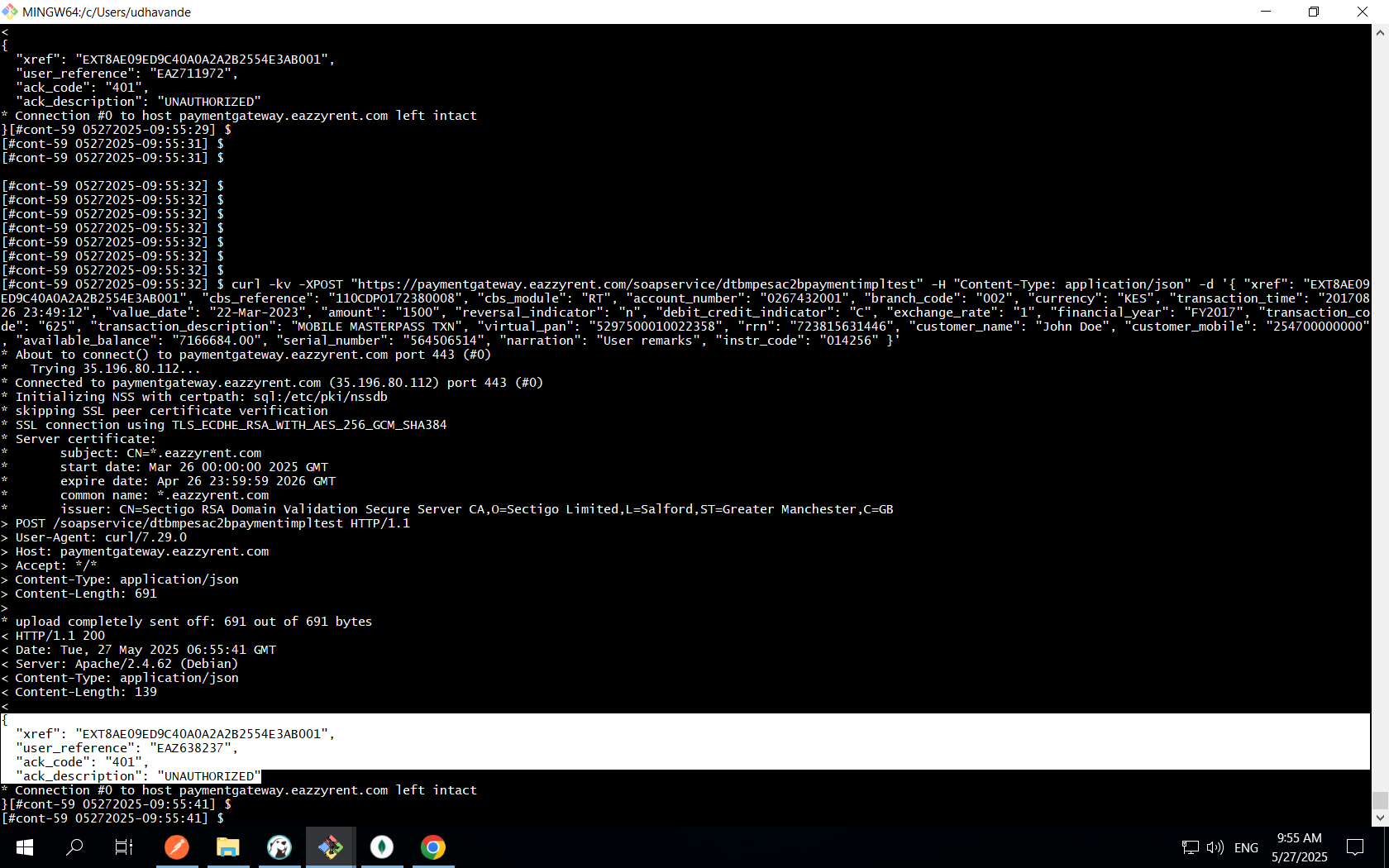
📞 Escalation Required: If you receive any of the following, escalate immediately to bank team:
- Connection refused or timeout errors
- HTTP 5xx server errors
- Invalid/empty responses
- Authentication failures despite correct setup
Escalation Message: "We are receiving an invalid response from the IPN endpoint. The service appears to be unavailable or misconfigured. Please verify the service status and configuration on your end."
Purpose: Test the complete request flow through internal load balancers and proxy servers to identify any intermediate routing or processing failures.
# Test through internal load balancer/proxy
INTERNAL_LB="internal-lb.apizone.io"  # Adjust based on your setup
LB_PORT="80"  # or 443 for HTTPS

#curl -kv -XPOST "http://Internal-url" \
  -H "Content-Type: application/json" \
  -d '{
    "xref": "EXT8AE09ED9C40A0A2A2B2554E3AB001",
    "cbs_reference": "110CDPO172380008",
    "cbs_module": "RT",
    "account_number": "0692625001",
    "branch_code": "002",
    "currency": "KES",
    "transaction_time": "20170826 23:49:12",
    "value_date": "22-Mar-2023",
    "amount": "1500",
    "reversal_indicator": "n",
    "debit_credit_indicator": "C",
    "exchange_rate": "1",
    "financial_year": "FY2017",
    "transaction_code": "625",
    "transaction_description": "MOBILE MASTERPASS TXN",
    "virtual_pan": "5297500010022358",
    "rrn": "723815631446",
    "customer_name": "John Doe",
    "customer_mobile": "254700000000",
    "available_balance": "7166684.00",
    "serial_number": "564506514",
    "narration": "User remarks",
    "instr_code": "014256"
  }'
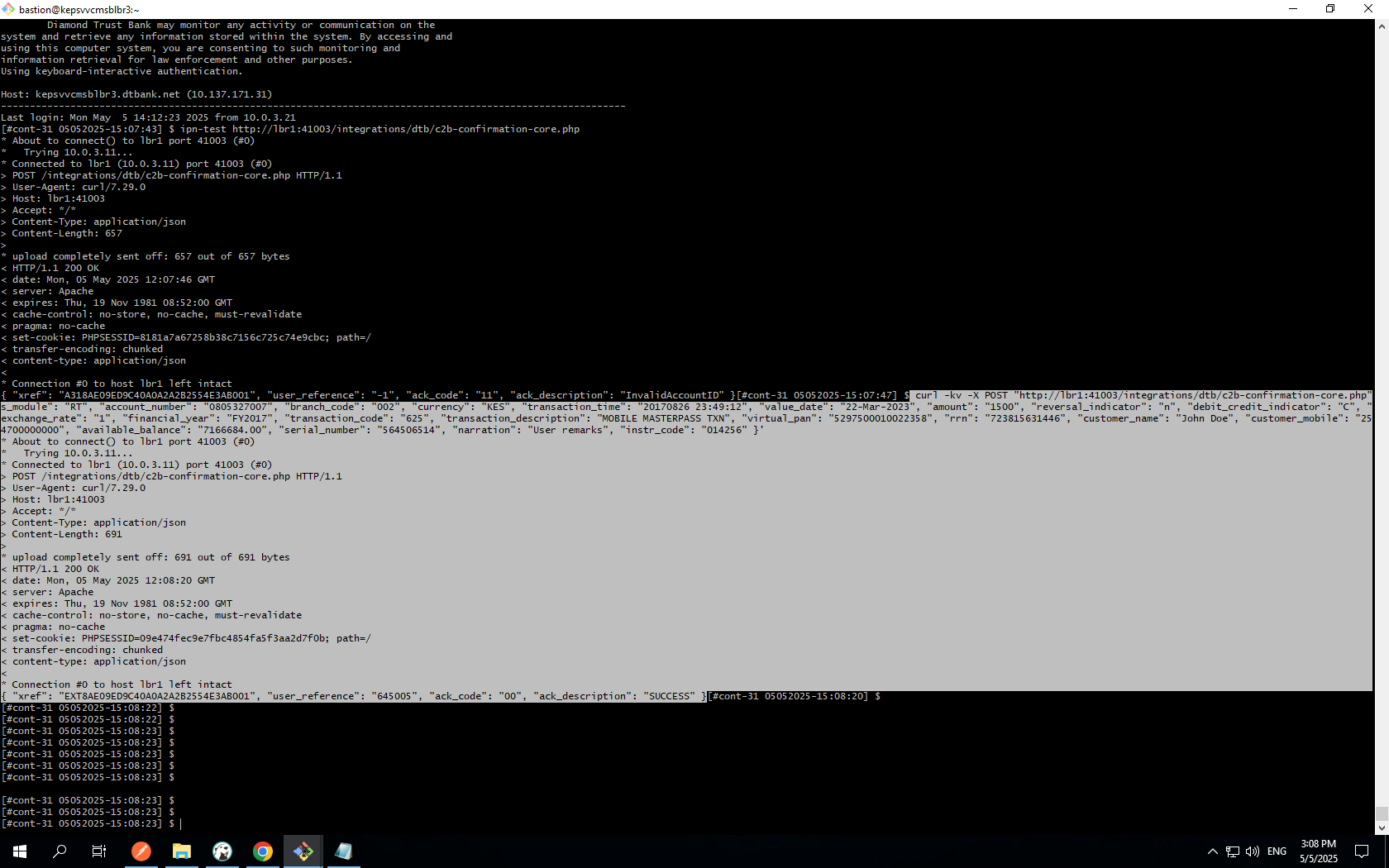
💡 Next Steps Based on Results:
- If LB test succeeds but direct test failed: Network issue between LB and backend
- If direct test succeeds but LB test fails: Load balancer configuration issue
- If both tests fail: Backend service issue - escalate to bank team
- If both tests succeed: Issue may be intermittent - proceed to Step 6
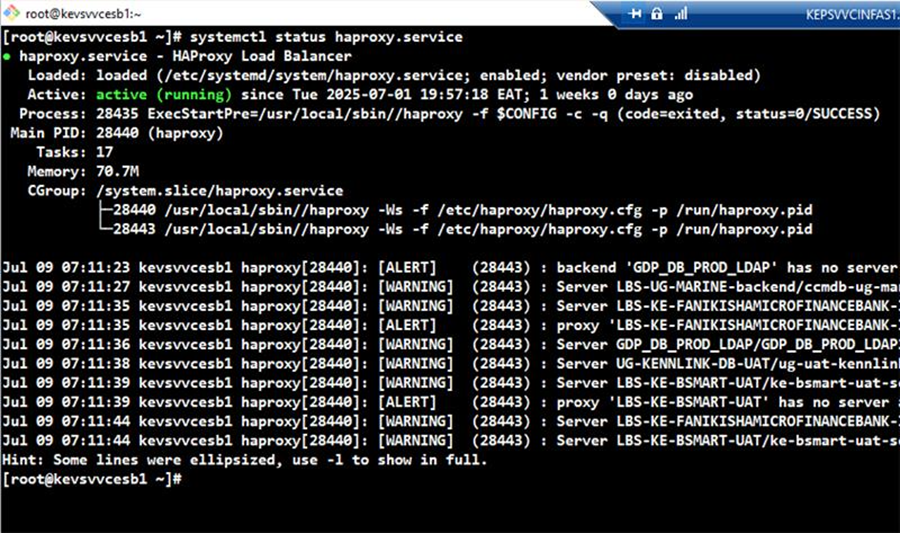
⚠️ When to Use This Step: Execute this step only when previous tests indicate configuration issues, service failures, or when you need to apply fixes based on identified problems.
# Navigate to configuration directory
cd /etc/openresty/conf.d

# Test OpenResty configuration
openresty -t 2>&1

# If test is ok, check service status
    echo "Configuration test passed"
    systemctl status openresty
# If configuration is in HAProxy
cd /etc/haproxy/

# Test HAProxy configuration
haproxy -f /etc/haproxy/haproxy.cfg -c

# Check HAProxy service status
systemctl status haproxy
📞 Escalation Procedures
When to Escalate: Escalate to the bank team when backend services are unresponsive, configurations are correct but connectivity fails, or when you encounter authentication/authorization errors beyond your scope.
Escalation Template: "We have completed our troubleshooting steps for the IPN issue. Our tests show [specific findings]. The issue appears to be [specific problem area]. Please verify [specific request] on your end."